วิธีเชื่อมต่อ VPS Windows ผ่านแอป Windows App

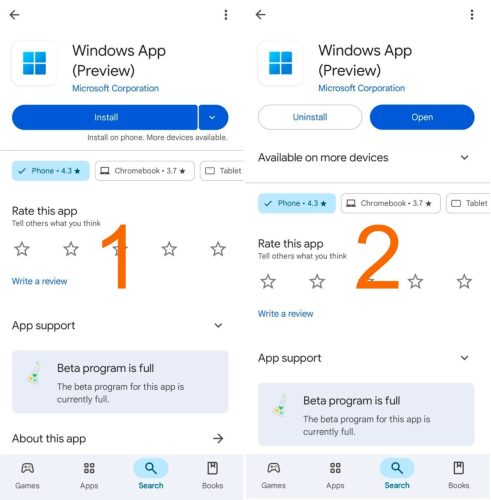
1. ติดตั้งแอป Windows App

เปิด App Store หรือ Google Play แล้วติดตั้งแอปชื่อว่า Windows App จากนั้นกดปุ่ม Install

สำหรับ Android:
https://play.google.com/store/apps/details?id=com.microsoft.rdc.androidx.beta

สำหรับ iOS:
https://apps.apple.com/us/app/windows-app-mobile/id714464092

สำหรับ Mac:
https://apps.apple.com/us/app/windows-app/id1295203466

2. เปิดแอป Windows App

เมื่อติดตั้งแอปเสร็จแล้ว ให้กดปุ่ม Open เพื่อเปิดแอป Windows App

1. ติดตั้งแอป Windows App-tile

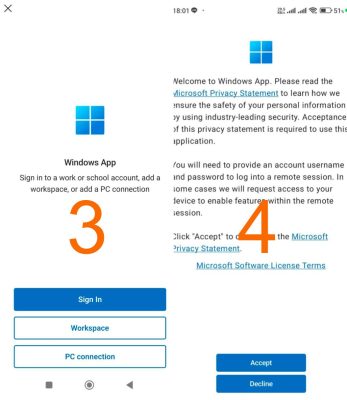
3. ยอมรับเงื่อนไขของแอป

กดปุ่ม Accept เพื่อยอมรับเงื่อนไขของแอป
จากนั้นกดปุ่ม Got it


4. เลือก PC Connection

กดปุ่ม PC Connection

ยอมรับเงื่อนไขของแอป

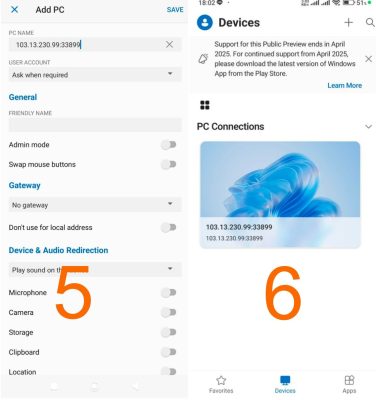
5. กรอก IP สำหรับเชื่อมต่อ

กรอก IP ตามด้วย :33899 ในช่อง PC Name

ตัวอย่าง: 103.13.230.99:33899

จากนั้นกดปุ่ม Save


6. เลือก VPS ที่เพิ่มไว้

แอปจะเพิ่มหน้าจอขึ้นมา
ให้แตะที่หน้าจอที่แสดง IP ของเรา เพื่อเชื่อมต่อ VPS

กรอก IP สำหรับเชื่อมต่อ

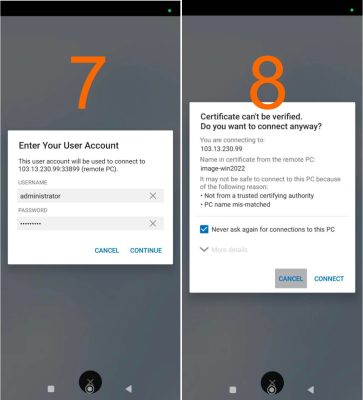
7. กรอก Username และ Password

กรอก Username และ Password ที่ได้รับทางอีเมล จากนั้นกดปุ่ม Continue

8. ยืนยันการเชื่อมต่อ

ติ๊กถูกที่ช่อง Never ask again
เพื่อไม่ให้ระบบเด้งขึ้นมาอีกในครั้งต่อไป จากนั้นกดปุ่ม Connect

กรอก Username และ Password


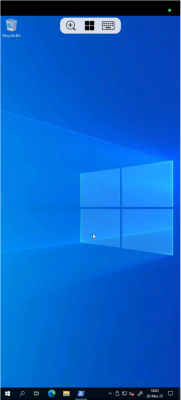
เชื่อมต่อ VPS สำเร็จ
Picture of นิกร รักยิ่งงาม

นิกร รักยิ่งงาม

นิกรเป็นผู้เชี่ยวชาญด้าน IT Support มากกว่า 12 ปี รับผิดชอบการช่วยเหลือลูกค้าด้านเทคนิคเกี่ยวกับ Windows Server, Linux Server, Forex VPS, Web Server, เว็บไซต์ CMS รวมถึงการตั้งค่า Domain และ DNS โดยเน้นการแก้ปัญหาแบบเข้าใจง่าย ทำให้ระบบกลับมาใช้งานได้เสถียรและปลอดภัย


Picture of นิกร รักยิ่งงาม

นิกร รักยิ่งงาม

นิกรเป็นผู้เชี่ยวชาญด้าน IT Support มากกว่า 12 ปี รับผิดชอบการช่วยเหลือลูกค้าด้านเทคนิคเกี่ยวกับ Windows Server, Linux Server, Forex VPS, Web Server, เว็บไซต์ CMS รวมถึงการตั้งค่า Domain และ DNS โดยเน้นการแก้ปัญหาแบบเข้าใจง่าย ทำให้ระบบกลับมาใช้งานได้เสถียรและปลอดภัย

อ่านต่อ...

small_c_popup.png

บริการ Premium VPS และ Cloud Hosting เร็วกว่าด้วยเซิร์ฟเวอร์ในไทย

รับส่วนลด 50%

ท้าให้ลอง VPS ที่ได้รับรีวิวบริการดีเยี่ยมสูงสุดใน Google Review

Privacy Overview

This website uses cookies so that we can provide you with the best user experience possible. Cookie information is stored in your browser and performs functions such as recognising you when you return to our website and helping our team to understand which sections of the website you find most interesting and useful. You can find full details of our Privacy Policy here.